The evolution of the world of photography
Creating an Art Painting
Scale 1/10
Using artificial intelligence to create and enhance photographs is essential for creators who want to deliver their work on time and with impeccable quality.
- Accelerated creation for increased production
- Greater precision in photo creation
- Creative assistance to optimize presentation

Starting with a front view drawing, it's easy to request A-I-Design to create views at different angles with a simple written command. First, the front view was automatically converted into a 3D image, which was then asked to create views at different angles—here, seven front, side, and rear views.
Example of a prompt for creating a 30-degree view:
1) Import the front view drawing into A-I-Design.
2) Prompt: Create a 30-degree side view.
How to create these views with only a front drawing
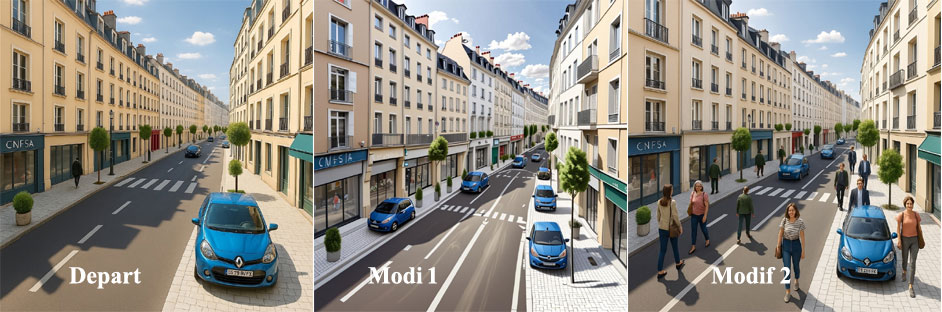
Starting with a front-facing drawing, it's easy to ask A-I-Design to modify the appearance of a photograph and enhance its presentation. It's also possible to add elements to the photo; here, we've added cars and people to enrich the presentation. The user is free to make any desired modifications, within the limits of the artificial intelligence's capabilities.
Example instruction for creating a painting:
Import a drawing or ask AI-Design, via OpenAI, to create a photo of a downtown street.
1) Prompt: Create a photo representing a downtown street
2) Prompt: Add cars...
3) Prompt: Add people walking in the street